eShop Architecture Patterns
A concise note on every architecture pattern used across the eShop services.
eShop is Microsoft’s reference e-commerce app for .NET, built as a set of small services instead of one big program. I went through it to work out which architecture patterns it uses and where.
1. .NET Aspire orchestration
Source: src/eShop.AppHost/Program.cs
Aspire is the conductor. One file declares every bit of infrastructure and every service, and it wires them together:
1
2
3
4
5
6
7
8
9
10
11
12
var redis = builder.AddRedis("redis");
var rabbitMq = builder.AddRabbitMQ("eventbus")
    .WithLifetime(ContainerLifetime.Persistent);
var postgres = builder.AddPostgres("postgres")
    .WithImage("ankane/pgvector")
    .WithImageTag("latest")
    .WithLifetime(ContainerLifetime.Persistent);

var catalogDb = postgres.AddDatabase("catalogdb");
var identityDb = postgres.AddDatabase("identitydb");
var orderDb = postgres.AddDatabase("orderingdb");
var webhooksDb = postgres.AddDatabase("webhooksdb");
Each service then states, in code, what it depends on:
1
2
3
4
var basketApi = builder.AddProject<Projects.Basket_API>("basket-api")
    .WithReference(redis)                      // "basket-api needs Redis"
    .WithReference(rabbitMq).WaitFor(rabbitMq) // "...and RabbitMQ, wait for it"
    .WithEnvironment("Identity__Url", identityEndpoint);
From those few declarations, Aspire:
Spins up the Redis, RabbitMQ, and PostgreSQL containers automatically
Injects each service’s connection strings as environment variables
Enforces startup ordering (
.WaitFor(...))Enables service discovery, so services reference each other by name (
"basket-api","catalog-api")Provides a dashboard with health checks, logs, traces, and metrics
Each service also pulls in a shared set of defaults from src/eShop.ServiceDefaults/Extensions.cs. Most call AddServiceDefaults(), which switches on OpenTelemetry, health checks, resilient HTTP clients, and service discovery in one line. Basket.API and OrderProcessor call the lighter AddBasicServiceDefaults() instead (just OpenTelemetry and health checks), skipping the outgoing-HTTP resilience so Polly can be trimmed out of those two.
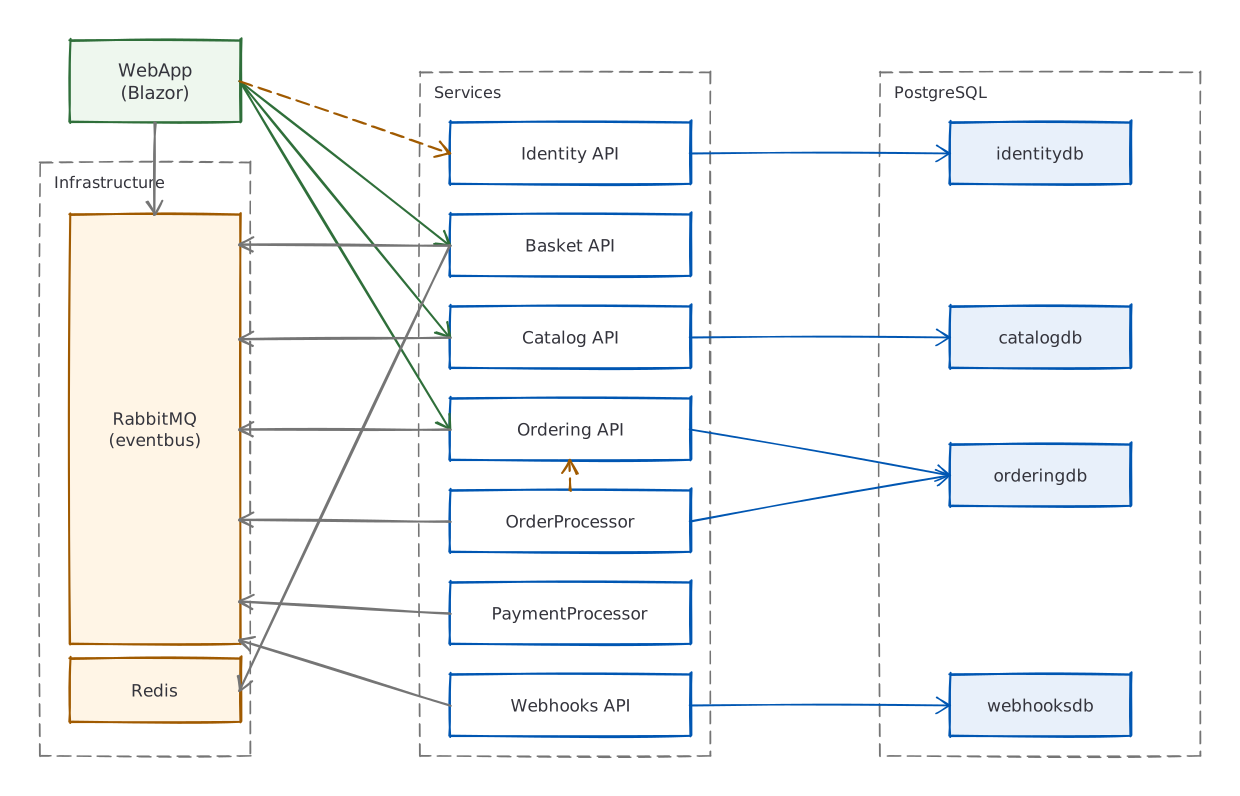
2. Three communication patterns
The services talk to each other in three different ways, and the choice is deliberate every time.
Pattern A: synchronous HTTP REST (solid arrows)
This is for when a caller needs an answer right now: loading the product catalog, viewing order history.
1
Browser → WebApp (Blazor) → HTTP GET → Catalog.API → PostgreSQL
The Ordering API (src/Ordering.API/Apis/OrdersApi.cs) defines its endpoints with minimal APIs:
1
2
3
var api = app.MapGroup("api/orders").HasApiVersion(1.0);
api.MapGet("{orderId:int}", GetOrderAsync);
api.MapPost("/", CreateOrderAsync);
Pattern B: synchronous gRPC
This is for where speed matters most: the shopping cart. The Basket API uses gRPC instead of REST. gRPC lets one service call another’s methods almost as if they were local, sending compact binary messages over HTTP/2 rather than JSON text over HTTP/1.1.
The server (src/Basket.API/Grpc/BasketService.cs):
1
2
3
4
5
6
7
8
9
10
11
12
public class BasketService(
    IBasketRepository repository,
    ILogger<BasketService> logger) : Basket.BasketBase  // generated from .proto file
{
    public override async Task<CustomerBasketResponse> GetBasket(
        GetBasketRequest request, ServerCallContext context)
    {
        var userId = context.GetUserIdentity();
        var data = await repository.GetBasketAsync(userId);  // reads from Redis
        return MapToCustomerBasketResponse(data);
    }
}
Cart operations happen constantly (add an item, remove an item), and gRPC fits that workload better than REST/JSON for three reasons:
Binary serialization (Protocol Buffers). REST sends human-readable JSON text (
{"productId": 42, "quantity": 1}). gRPC sends the same data as compact binary bytes, following a schema written in a.protofile. The field names aren’t sent at all, just field numbers and values, so the payload is generally smaller than the equivalent JSON. Less data means less time on the wire and less CPU spent parsing, though exactly how much smaller depends on the message.HTTP/2 multiplexing. REST typically runs on HTTP/1.1, where each request-response holds a connection until it’s done. If the WebApp wants to send “get basket” and “update basket” at the same time, HTTP/1.1 either queues them (head-of-line blocking) or opens a second TCP connection. HTTP/2, which gRPC requires, packs many requests onto a single TCP connection as interleaved binary frames. For a cart with rapid back-and-forth, that removes a lot of connection overhead.
Strongly-typed code generation. The
.protoschema file generates both the C# server base class and the client stub at build time. There’s no hand-written URL construction, no JSON serializer mismatch, and no runtime reflection. That isn’t a speed advantage, but it deletes a whole class of serialization bugs.
sequenceDiagram
    participant W as WebApp
    participant B as Basket API
    participant R as Redis

    Note over W,B: gRPC over HTTP/2 (single connection)

    W->>B: GetBasket (binary Protobuf)
    B->>R: GET basket:userId
    R-->>B: cached basket data
    B-->>W: CustomerBasketResponse (binary Protobuf)

    W->>B: UpdateBasket (binary Protobuf)
    B->>R: SET basket:userId
    R-->>B: OK
    B-->>W: CustomerBasketResponse (binary Protobuf)
gRPC is the wrong fit in a few common cases: when the client is a browser (gRPC-Web exists but adds complexity), when you want human-readable traffic for debugging (JSON is easier to eyeball), or when the API is public-facing (REST and OpenAPI have the better tooling ecosystem). The Catalog and Ordering APIs use REST for those reasons.
Pattern C: asynchronous events via RabbitMQ
When something happens in one service that other services need to know about, the service it happened in publishes an integration event to RabbitMQ and moves on. It doesn’t know or care who’s listening. That’s the whole point: the services stay decoupled, and you can add a new listener later without touching the publisher.
The base class (src/EventBus/Events/IntegrationEvent.cs):
1
2
3
4
5
public record IntegrationEvent
{
    public Guid Id { get; set; }
    public DateTime CreationDate { get; set; }
}
The contract (src/EventBus/Abstractions/IEventBus.cs):
1
2
3
4
public interface IEventBus
{
    Task PublishAsync(IntegrationEvent @event);
}
The implementation (src/EventBusRabbitMQ/RabbitMQEventBus.cs) publishes to a direct exchange named eshop_event_bus. A direct exchange routes each message to queues by an exact label called a routing key, and here the routing key is the event’s type name, so a queue subscribes to the event types it cares about. It also threads OpenTelemetry tracing through, so you can follow one event across services.
graph LR
    Publisher[Any Service] -->|PublishAsync| Exchange{{eshop_event_bus<br/>direct exchange}}
    Exchange -->|routing key:<br/>OrderStartedIntegrationEvent| Q1[Basket API queue]
    Exchange -->|routing key:<br/>OrderStatusChangedToAwaitingValidation...| Q2[Catalog API queue]
    Exchange -->|routing key:<br/>OrderStatusChangedToStockConfirmedIntegrationEvent| Q3[Payment Processor queue]
    Exchange -->|routing key:<br/>ProductPriceChangedIntegrationEvent| Q4[Webhooks API queue]
3. Example: placing an order
Placing an order is where all three patterns show up at once. The full flow, then a step-by-step walk-through:
sequenceDiagram
    actor User
    participant WebApp as Blazor WebApp
    participant Ordering as Ordering API
    participant MediatR
    participant Handler as CreateOrderCommandHandler
    participant DB as PostgreSQL (orderingdb)
    participant RMQ as RabbitMQ
    participant Basket as Basket API
    participant Catalog as Catalog API
    participant Payment as Payment Processor

    User->>WebApp: Submit order
    WebApp->>Ordering: POST /api/orders
    Ordering->>MediatR: Send(IdentifiedCommand)

    rect rgba(99, 130, 230, 0.12)
        Note right of MediatR: DB Transaction (atomic)
        MediatR->>Handler: Handle(CreateOrderCommand)
        Handler->>DB: Save IntegrationEvent to outbox
        Handler->>DB: Save Order aggregate
        Handler->>DB: Dispatch domain events<br/>(create Buyer, etc.)
        MediatR->>DB: COMMIT
    end

    MediatR->>RMQ: Publish pending events

    par Async fan-out
        RMQ-->>Basket: OrderStartedIntegrationEvent
        Basket->>Basket: Delete basket (clear cart)
    and
        RMQ-->>Catalog: OrderStatusChangedToAwaitingValidationIntegrationEvent
        Catalog->>Catalog: Check stock
        Catalog->>RMQ: OrderStockConfirmedIntegrationEvent
    end

    RMQ-->>Ordering: OrderStockConfirmedIntegrationEvent
    Ordering->>RMQ: OrderStatusChangedToStockConfirmedIntegrationEvent
    RMQ-->>Payment: OrderStatusChangedToStockConfirmedIntegrationEvent
    Payment->>RMQ: OrderPaymentSucceededIntegrationEvent
Step 1: WebApp sends the command (HTTP)
The browser submits the order. The WebApp turns that into an HTTP POST to Ordering.API /api/orders. That’s Pattern A: a plain synchronous request.
Step 2: CQRS with MediatR
The endpoint wraps the request in a command object and hands it to MediatR, which routes the message to its registered handler. Sending requests as messages to dedicated handlers like this is the CQRS pattern: the commands that change things and the queries that read things travel separate paths instead of piling into one fat service class.
1
2
var requestCreateOrder = new IdentifiedCommand<CreateOrderCommand, bool>(command, requestId);
var commandResult = await services.Mediator.Send(requestCreateOrder);
IdentifiedCommand is an idempotency wrapper. If the same requestId shows up twice, say a flaky network made the browser retry, the duplicate is quietly ignored instead of creating a second order.
Step 3: the command handler builds the Order aggregate (DDD)
CreateOrderCommandHandler (src/Ordering.API/Application/Commands/CreateOrderCommandHandler.cs) builds the order. The Order here is a domain-driven-design aggregate: one object that owns a cluster of related data (the order, its line items, the shipping address) and is the only door through which that data can change. That’s how the business rules end up enforced in one place rather than scattered across the codebase.
1
2
3
4
5
6
7
8
9
10
11
12
13
14
15
16
public async Task<bool> Handle(CreateOrderCommand message, CancellationToken cancellationToken)
{
    // Queue an integration event to tell other services
    var orderStartedIntegrationEvent = new OrderStartedIntegrationEvent(message.UserId);
    await _orderingIntegrationEventService.AddAndSaveEventAsync(orderStartedIntegrationEvent);

    // Create the Order aggregate root (DDD)
    var address = new Address(message.Street, message.City, ...);
    var order = new Order(message.UserId, message.UserName, address, ...);

    foreach (var item in message.OrderItems)
        order.AddOrderItem(item.ProductId, item.ProductName, ...);

    _orderRepository.Add(order);
    return await _orderRepository.UnitOfWork.SaveEntitiesAsync(cancellationToken);
}
Step 4: domain events fire inside the same process
When the Order is constructed it raises an OrderStartedDomainEvent (see the Order aggregate root). After SaveEntitiesAsync(), MediatR hands these domain events to their handlers, all running inside the same process and the same DB transaction:
ValidateOrAddBuyerAggregateWhenOrderStartedDomainEventHandlervalidates or creates the BuyerOrderStatusChangedToAwaitingValidationDomainEventHandlerqueues an integration event for RabbitMQ via the outbox
Those are two different things that sound alike. Domain events stay inside one service (same process, same transaction); integration events cross between services (over RabbitMQ).
The outbox is what makes the crossing safe. You want to do two things together: save the order, and tell other services about it. If you saved to the database and then published to RabbitMQ as two separate steps, a crash in between would leave them disagreeing, an order with nobody told, or an announcement of an order that didn’t save. So the integration events queued above are written into an outbox table in the same DB transaction as the order. TransactionBehavior commits that transaction and only then calls PublishEventsThroughEventBusAsync(transactionId) (OrderingIntegrationEventService) to push them to RabbitMQ. An event is never published unless its order was durably saved first.
Step 5: integration events fan out across services
OrderStartedIntegrationEvent reaches Basket.API over RabbitMQ (OrderStartedIntegrationEventHandler.cs), which clears the cart now that the order exists:
1
2
3
4
public async Task Handle(OrderStartedIntegrationEvent @event)
{
    await repository.DeleteBasketAsync(@event.UserId);  // clear the cart
}
OrderStatusChangedToAwaitingValidationIntegrationEvent reaches Catalog.API, which checks stock (OrderStatusChangedToAwaitingValidationIntegrationEventHandler.cs):
1
2
3
4
5
6
7
8
9
10
foreach (var orderStockItem in @event.OrderStockItems)
{
    var catalogItem = catalogContext.CatalogItems.Find(orderStockItem.ProductId);
    var hasStock = catalogItem.AvailableStock >= orderStockItem.Units;
    confirmedOrderStockItems.Add(new ConfirmedOrderStockItem(catalogItem.Id, hasStock));
}

var confirmedIntegrationEvent = confirmedOrderStockItems.Any(c => !c.HasStock)
    ? new OrderStockRejectedIntegrationEvent(...)
    : new OrderStockConfirmedIntegrationEvent(...);
Step 6: payment and shipping
OrderStockConfirmedIntegrationEvent comes back to Ordering.API, which moves the order to stock-confirmed and publishes OrderStatusChangedToStockConfirmedIntegrationEvent. PaymentProcessor subscribes to that one (OrderStatusChangedToStockConfirmedIntegrationEventHandler.cs), takes the payment, and publishes OrderPaymentSucceededIntegrationEvent (or OrderPaymentFailedIntegrationEvent). Earlier in the flow, the OrderProcessor background worker sits out a grace period after the order is submitted (a window for the customer to cancel), then publishes GracePeriodConfirmedIntegrationEvent, which moves the order to awaiting-validation and kicks off the stock check above.
The OrderStatusChangedTo* events are published by Ordering.API as the order’s status advances, and they’re what the other services subscribe to; the grace period before validation is driven by the OrderProcessor worker. The full chain:
1
2
3
4
5
6
7
8
OrderStartedIntegrationEvent                            → Basket clears the cart
OrderStatusChangedToSubmittedIntegrationEvent           → WebApp shows the order as submitted
GracePeriodConfirmedIntegrationEvent                    → Ordering moves the order to AwaitingValidation
OrderStatusChangedToAwaitingValidationIntegrationEvent  → Catalog checks stock
OrderStockConfirmedIntegrationEvent                     → Ordering marks StockConfirmed
OrderStatusChangedToStockConfirmedIntegrationEvent      → PaymentProcessor charges
OrderPaymentSucceededIntegrationEvent                   → Ordering marks the order Paid
OrderStatusChangedToPaidIntegrationEvent                → Webhooks.API, WebApp, and Catalog react
Shipping is a separate, admin-triggered step. It raises OrderStatusChangedToShippedIntegrationEvent, which both Webhooks.API and the WebApp subscribe to, and the WebApp updates the order page in real time.
4. Summary of all patterns
| Pattern | Where | Why |
|---|---|---|
| Aspire Orchestration | AppHost | Automatic infra, service discovery, observability |
| CQRS + MediatR | Ordering.API | Separate read/write paths, behavior pipelines |
| DDD Aggregates | Ordering.Domain | Business rules enforced through aggregate roots |
| Domain Events | Within Ordering service | Intra-service coordination (same transaction) |
| Integration Events | All services via RabbitMQ | Inter-service coordination (async, decoupled) |
| Outbox Pattern | IntegrationEventLogEF | Event saved in the order’s transaction, published after commit |
| gRPC | Basket.API | Binary, low-overhead communication |
| BFF (Backend-for-Frontend) | Mobile BFF (YARP) | Tailored API surface for mobile clients |
| Database-per-Service | All services | Data isolation, independent deployability |
| Idempotent Commands | Ordering.API | Safe retries with IdentifiedCommand |