SharpFocus Part 1: Understanding Code Through Data Flow
Reading code as data flow, not just text.
SharpFocus is a Visual Studio Code extension I wrote to answer a question that sounds simple until you try to answer it by hand: where did this value come from, and what does changing it touch? This series is about how it works. This first part is about the idea underneath it, and the easiest way in is a bug.
The dependency problem
Take this class:
1
2
3
4
5
6
7
8
9
10
11
12
13
14
15
16
17
18
19
20
21
22
23
24
25
26
27
28
29
30
31
32
33
34
35
36
37
38
39
40
41
42
43
44
45
46
47
48
49
50
51
52
53
54
55
56
57
58
59
60
61
62
63
64
65
66
67
68
69
70
71
72
public class OrderProcessor
{
    private Order? _currentOrder;
    private readonly IOrderRepository _repository;
    private readonly IOrderCache _cache;

    public OrderProcessor(IOrderRepository repository, IOrderCache cache)
    {
        _repository = repository;
        _cache = cache;
    }

    public async Task InitializeAsync(int orderId, bool preferCache)
    {
        if (preferCache)
        {
            _currentOrder = await _cache.GetAsync(orderId);
            if (_currentOrder == null)
            {
                _currentOrder = await _repository.FetchAsync(orderId);
                await _cache.PutAsync(orderId, _currentOrder);
            }
        }
        else
        {
            _currentOrder = await _repository.FetchAsync(orderId);
        }
    }

    public void ResetIfExpired(DateTime snapshotUtc)
    {
        if (_currentOrder != null && _currentOrder.LastUpdated < snapshotUtc)
        {
            _currentOrder = null;
        }
    }

    public void ApplyManualOverride(Order? manualOrder)
    {
        if (manualOrder?.IsValid ?? false)
        {
            _currentOrder = manualOrder;
        }
    }

    public bool Validate()
    {
        if (_currentOrder == null)
        {
            return false;
        }

        if (_currentOrder.Total > 1000)
        {
            _currentOrder.RequiresApproval = true;
            return false;
        }

        return true;
    }

    public async Task ProcessAsync()
    {
        if (!Validate())
        {
            return;
        }

        await SendToQueueAsync(_currentOrder!);
        _currentOrder.Status = OrderStatus.Completed;
    }
}
A bug shows up in production: _currentOrder is null by the time ProcessAsync runs, and now you have to work out why. There are a few ways it could have happened. Maybe it was never loaded, because both the cache and the repository came back empty. Maybe the scheduled freshness check ran ResetIfExpired a moment earlier and wiped it. Maybe something called ApplyManualOverride with a null. The stack trace tells you where it crashed, not which of those paths put the null there. And in this setup a coordinator awaits InitializeAsync before calling the guard and the processor, so every one of those branches really can run before the failure.
To find the answer you have to trace the value backward through the code, and the tools you’d normally reach for each get you only part of the way:
- Find All References lists every mention of
_currentOrder, but it can’t tell a read from a write, or a source from a sink. - A debugger shows you real values, but only once you can reproduce the exact failure and step through it.
- Reading it yourself means holding every possible path in your head at once, which stops being feasible in a method this size.
What you actually want to ask is: which statements could have changed this variable before control reached here? That is the dependency problem, and answering it means following data flow instead of text.
Program slicing
The formal answer is older than you might guess. Mark Weiser described program slicing in 1981. A slice is the subset of a program that keeps the same behaviour for one variable at one location, which he called the slicing criterion. You point at a value, and the slice is everything that matters for it.
The difference from text search is that slicing works on meaning, not spelling. It knows that x = y moves data from y into x, while print(x) moves data out of x to the console. A find-and-replace can’t tell those apart; a slicer can.
You can slice in either direction.
A backward slice starts from a variable at a point in the code and finds every statement that could have influenced its value. It answers “where did this come from?”
A forward slice goes the other way: from a variable, it finds every statement that the value could go on to affect. It answers “what depends on this?”
A backward slice
Go back to OrderProcessor. Put the cursor on _currentOrder in the if (_currentOrder == null) guard inside Validate, and ask for a backward slice. You get:
_currentOrder = await _cache.GetAsync(orderId);, the cache hit assignment_currentOrder = await _repository.FetchAsync(orderId);, both the direct load and the cache-miss fallback_currentOrder = manualOrder;inApplyManualOverride, a different entry point that can replace the value_currentOrder = null;inResetIfExpired, a mutation that can wipe the state- The guard itself, the location where the null is observed
The slice leaves out SendToQueueAsync, because it runs after the guard and can’t affect whether the value was null there. It also ignores every field that never flows into _currentOrder.
Read top to bottom, those few lines are the whole history of the value: the null could come from a cache miss, a manual override, or an expiry reset. Without the slice you’d be opening each of those paths by hand and trying to hold their interleaving in your head.
The real payoff is readability. A slice collapses statements scattered across the class into one story you can read in order. Instead of jumping between cache code, override handlers, and lifecycle hooks, you see only the handful of lines that matter for the failure in front of you. The trade-off is that a slice is only as current as the analysis behind it; a stale cache or a partially loaded project can hide a path that actually matters. SharpFocus warns you when its analysis is stale, but it’s still worth rerunning after a big merge or a dependency bump.
A forward slice
Now put the cursor on the assignments that load _currentOrder in InitializeAsync and ask for a forward slice. You get:
- The loading statements themselves, both the cache hit and the repository fetch
- The guard
if (_currentOrder == null)insideValidate, control flow that depends on the value _currentOrder.RequiresApproval = true;, a mutation based on the loaded dataawait SendToQueueAsync(_currentOrder!);, the value flowing into an external system_currentOrder.Status = OrderStatus.Completed;, a later mutation on the same object_currentOrder = null;inResetIfExpired, where the assignment’s influence stops
Every statement in that list would behave differently if _currentOrder were loaded differently. That’s the question you want answered before you change how the value is loaded, or before you trust a fix.
It stays readable for the same reason the backward slice does: the result is still code, not an abstract graph, just pared down to the lines you need. You stay in the source file and keep your bearings instead of filtering noise by hand. The cost shows up when the slice jumps across files or into generated code; you’ll sometimes have to open those sites to check an assumption, so it works best alongside good navigation in the editor.
How the dependency sets combine
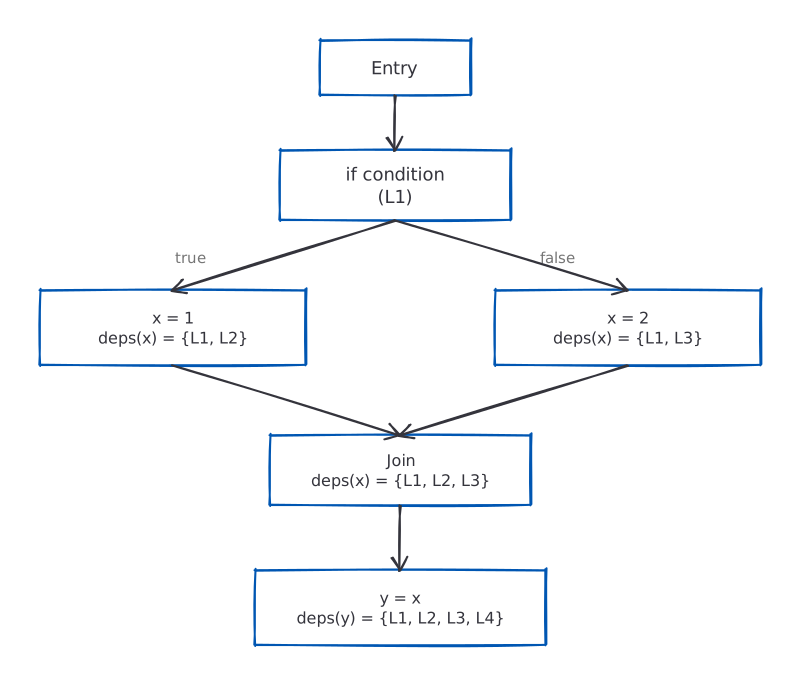
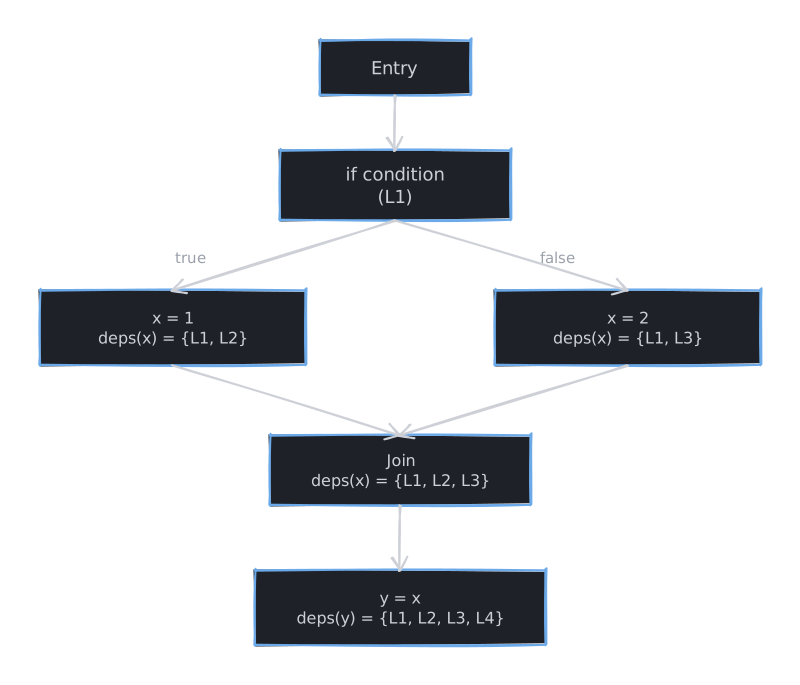
Under the hood the analysis needs a rule for what to do when paths split and rejoin. The structure it uses has a name, the lattice, but the idea is plain. Every variable, at every point in the program, carries a dependency set: the locations whose values could flow into it. Three operations are enough to work with those sets:
- Bottom (⊥): the empty set, before any dependency is known.
- Join (∪): set union, used to merge the dependencies arriving from two different paths.
- Ordering (⊆): the subset relation; a smaller set is a more precise answer than a larger one.
Take this code:
1
2
3
4
5
6
7
int x;
if (condition)
    x = 1;  // Location L1
else
    x = 2;  // Location L2

int y = x;  // Location L3
At L3 the dependency set for x is {L1, L2}, because either assignment could be the one that ran. That set is the join of the two branches. SharpFocus keeps recomputing sets like this until another pass adds nothing new, a settled state called a fixpoint. That’s what lets it handle branches and loops without special-casing them.
Making the dependencies visible
SharpFocus is the Visual Studio Code extension that puts this to work. It runs static analysis on your C# using Roslyn, the compiler platform that already understands the structure, types, and symbols in your code, so the analysis works on meaning rather than text.
It runs in three stages:
- Build a control flow graph. The code becomes a directed graph: nodes are basic blocks (runs of straight-line statements) and edges are the jumps between them, the branches and loops.
- Run the dataflow analysis. A fixpoint algorithm pushes dependency information around that graph until it settles, working out for each variable which locations could have influenced it.
- Extract the slice. Given where your cursor is, it pulls out the relevant dependency set and maps those locations back to ranges in the source so the editor can highlight them.
The result is interactive: click a variable and SharpFocus lights up its whole dependency chain.
Where this helps
The point of all this is what it does to everyday tasks.
Debugging
A service returns wrong results. The cause is subtle: a calculation is reading stale cached data instead of fresh values. The debugger confirms the symptom, but tracing back through five method calls to find where the cache got populated is tedious.
Put the cursor on the variable holding the bad result and run a backward slice. It highlights the whole chain: the cache read, the cache write, the database query that filled it, and the config flag that controls caching. The bug stands out, the cache invalidation has a hole, and you read a dozen statements instead of a few hundred.
Refactoring
A method’s parameter needs to change type, from string to the more general IFormattable. How many call sites need work? Find All References says 47. But which of those actually call string-specific methods, and which would take the more general type unchanged?
A forward slice from the parameter answers it. It shows exactly which statements lean on string-specific behaviour. In one migration I ran, only 8 of the 47 references called string-only APIs; the other 39 just passed the parameter along or used members that IFormattable already provides. That’s the difference between knowing what to test and testing everything.
Code review
A pull request changes a critical business rule, three lines in a 300-line class. What does it actually affect?
Point Focus Mode at the changed variables and you get the full picture: every statement feeding data into the change, and every statement affected by it. The reviewer sees the edit touches two validation checks and one logging call, and reviews those interactions instead of rereading the whole class.
Dependencies that aren’t assignments
Not every dependency is a plain assignment. Consider:
1
2
3
4
5
6
7
void UpdateStatus(Order order)
{
    if (order.Total > 1000)  // Control dependency
    {
        order.Status = OrderStatus.RequiresApproval;
    }
}
The assignment order.Status = OrderStatus.RequiresApproval depends on order.Total > 1000. Even though order.Total never appears in the assignment, its value decides whether the assignment runs at all. That kind of dependency is a control dependency, and SharpFocus tracks it: a backward slice from order.Status pulls in both the assignment and the condition guarding it.
Aliasing is the other case. When two variables point at the same object, a write through one is visible through the other:
1
2
3
4
var order1 = GetOrder(123);
var order2 = order1;  // Alias created
order2.Status = OrderStatus.Shipped;
ProcessOrder(order1);  // Uses the modified status
Writing order2.Status changes what order1 sees, because they’re the same object. So a forward slice from order2 has to include the uses of order1. Getting aliasing right is what keeps slices honest, and SharpFocus tracks these reference relationships to do it.
Summary
Program slicing answers questions that text search and a debugger can’t: what produced this value, and what will this change affect? It does that by computing the real, semantic relationships between statements instead of matching names.
SharpFocus brings that to C# in Visual Studio Code, built on established static-analysis work: control flow analysis, dependency tracking, and alias reasoning. The next part gets into how that’s actually built.
Next in this series: Part 2: The Analysis Engine goes under the hood, how the control flow graph is built, how dependency information propagates, and how the analysis copes with the trickier parts of the language.